Render 10,000 docs
before lunch.
Drop in a DOCX template. Hand us your data. We swap every
{{placeholder}}
and ship a stack of ready-to-send documents. No copy-paste, no merge fields, no surprises.
Your data.
Your documents.
No copy-paste.
Stop exporting spreadsheets and reformatting Word files. Upload a template once, feed in your data, and get a stack of ready-to-send documents in seconds.
- Bulk generate contracts, invoices, and reports in one go
- Multi-tenant by default, one account, many customers
- Team roles and access controls built in
- Auto-deliver by email or download as ZIP
Stop maintaining your own document stack
Self-hosted libraries mean you own the bugs, the modules, and the upgrade path. BulkRender is a REST API. POST data, GET document.
{
  "templateId": "invoice-v2",
  "data": { ... }
} - No SDK, no module paywalls, no instance limits
- Batch up to 500 docs in one request on Enterprise
- OpenAPI spec + llms.txt included
Let your agent handle it
Connect once via MCP. Claude can browse your templates, fill in the data, and pull back a signed download URL. No API code, no boilerplate. More MCP clients coming soon.
- One paste: hosted MCP URL from Settings, Integrations
- Walk-in mode: agents pay per session, no account needed
- Works with any LLM that supports tool use
Documents per batch on Enterprise
Average generation time
Template accuracy
Lines of code needed
Stop copy-pasting. Automate document generation.
Contracts, invoices, reports. Generate them in bulk from a single template.
Copy-paste into each document
Hours of manual formatting
Typos and wrong names
Upload once, generate thousands
Create a template with placeholders. We fill in the rest from your data.
50 documents in 5 seconds
Bulk generate from a spreadsheet. Download everything as a ZIP.
Perfect accuracy, every time
Your data goes directly into the document. No manual entry, no mistakes.
Built for bulk document automation
Milliseconds, Not Minutes
Generate hundreds of documents while your coffee brews. Batch processing included.
Team Roles & Permissions
Viewers, editors, managers, admins. Invite your team and control access.
Your Data Stays Yours
Tenant isolation. Encrypted storage. Documents auto-delete on your schedule.
Upload a DOCX Template
Add placeholders like {{firstName}} in any Word file. Formatting stays intact.
Add Your Data
Fill a form, upload a spreadsheet, or send data via the API. Fields map automatically.
Download Documents
Get Word or PDF output. One file or hundreds, same speed, same quality.
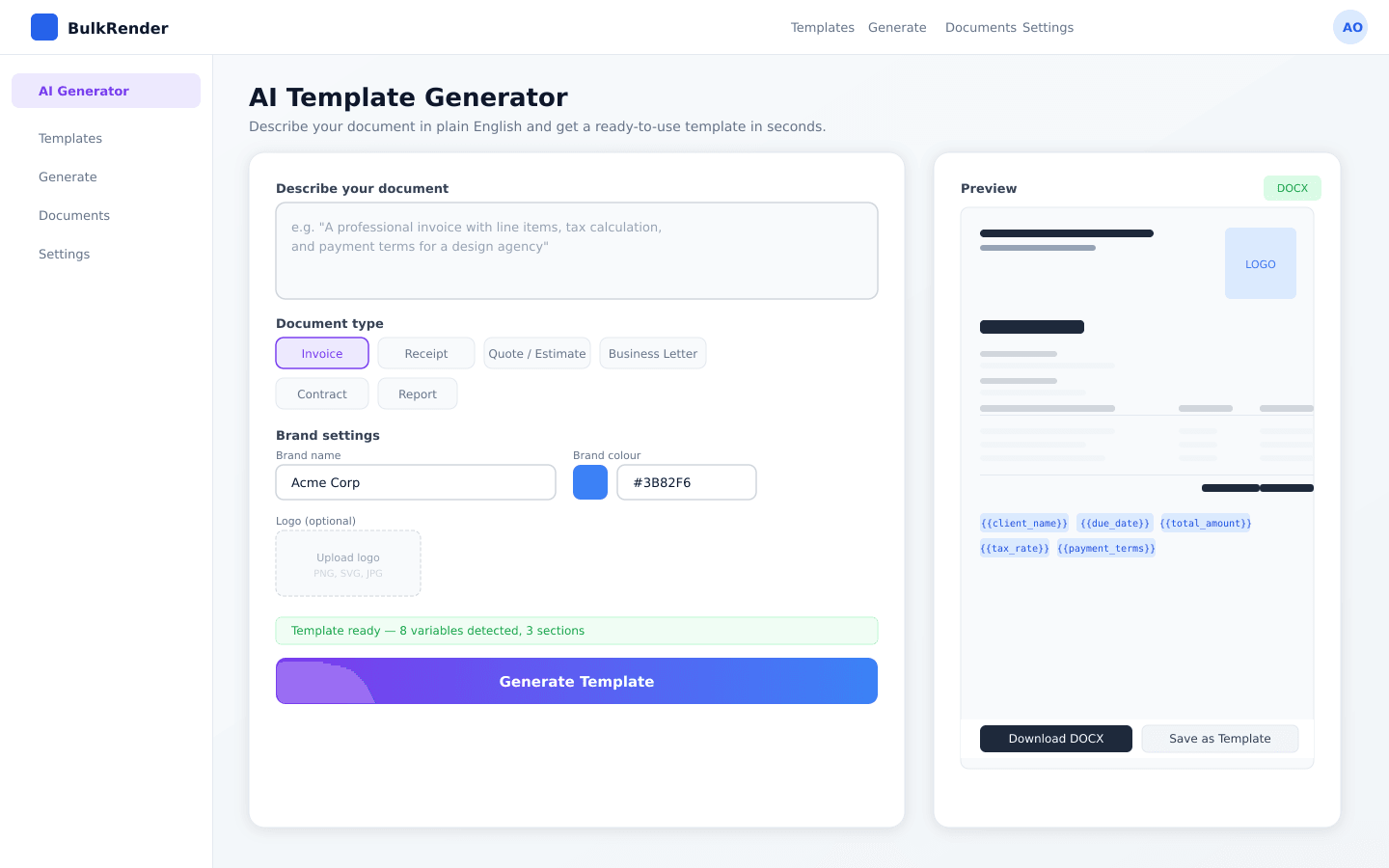
No template? Describe it in plain English.
Tell us what you need, like "a professional invoice with line items and payment terms", and get a ready-to-use DOCX template in about 30 seconds. Placeholders, branding, and formatting included.
★ 3 free generations included, then bring your own API key
Document generation FAQ
We support Microsoft Word (.docx) templates. Output is available in Word or PDF format. Your templates keep all formatting, styles, and images intact.
Everyone gets 3 free AI template generations. After that, you can add your own API key (OpenAI or Anthropic) in Settings. We never store your key in plain text. It's encrypted. Your key is used only for your generations.
Generated documents are stored based on your plan's retention period (3 to 90 days depending on plan). Documents are automatically deleted after expiration to protect your privacy. Download important documents before they expire. See plan details →
Rows with unusable values, like #N/A or other spreadsheet error cells, are skipped and reported instead of generating a broken document. You're never charged a credit for a skipped row, and the reason is listed right in your results so you know exactly which row to fix.
Use your normal Word file and add placeholders where you want data inserted. Use double curly braces like {{firstName}} or {{company}}. That's it. No special software needed.
Yes! Upload a spreadsheet, map your columns to template fields, and generate all documents at once. You'll download them as a ZIP file. Perfect for invoices, contracts, reports, or any bulk document needs.
Describe the document you need in plain English, like 'a professional invoice with company logo, line items, and payment terms'. We'll create a ready-to-use template with all the placeholders set up for you. You get 3 free AI generations, then you can add your own OpenAI or Anthropic API key.
Yes. Grab your hosted MCP URL from Settings, Integrations and paste it into your assistant. Claude (Claude.ai, Claude Desktop, Claude Code) is fully supported today, with more MCP clients coming soon. The agent calls list_templates, picks one, sends your data, and gets a signed download URL back. No API calls to write. Walk-in agents with no account can also pay per session using the ACP checkout tools built into the MCP server. See the MCP guide →
Claude is fully supported today: Claude.ai, Claude Desktop, and the Claude Code CLI. BulkRender speaks standard MCP, so other clients like Cursor, Windsurf, Cline, and custom agents are coming soon as we verify them. Setup takes one paste and the agent discovers all available tools automatically.
We're expanding the public template library so agents have access to templates across industries and document types. If your use case isn't covered yet, you can supply your own DOCX template directly in the session and the agent will use that instead.
Viewer: View templates and documents, download files
Editor: Create/edit templates, generate documents
Manager: Editor permissions + invite team members
Admin: Full access including role changes and API keys
Yes! During onboarding, you can upload your logo and set your brand color. These are automatically applied when generating AI templates. Admins can update branding anytime in Settings.
Still have questions? support@bulkrender.com
Stop creating documents by hand
Upload a template, add your data, and generate documents in seconds. Start with 25 free credits, no card needed.